
Background JavaScript actions
Build focused textAction or fileAction plugins for transformations, APIs, file operations, and automation without requiring a custom window.
SwiftBiuX plugin system
SwiftBiuX plugins can add fast background actions for text or files, while HTML + CSS + JavaScript web extensions can provide richer interactive interfaces. Plugins can participate in the toolbar, dedicated shortcuts, and other compatible trigger workflows.
Quick answer
SwiftBiu supports JavaScript plugins packaged as .swiftbiux extensions and richer HTML/CSS/JavaScript web extensions. Developers can build textAction or fileAction workflows, request only the permissions they need, and connect plugins to SwiftBiu triggers.
Verified 2026-08-12
Build focused textAction or fileAction plugins for transformations, APIs, file operations, and automation without requiring a custom window.
Use HTML, CSS, and JavaScript when the workflow needs forms, previews, progress, editable results, or another custom interface.
Declare only the clipboard, file, network, notification, or host capabilities the plugin actually uses.
Receive selected text, call your own processing logic or API, then copy or return the result to the user workflow.
Receive selected files, inspect the permitted paths, perform the declared file workflow, and save or report the output.
Add a custom HTML interface when the user needs inputs, a preview, progress, editing, or a multi-step interaction instead of a one-shot background action.
The macOS app includes an extension-management surface for built-in actions and installed SwiftBiuX packages, while the Developer Guide documents the manifest, permissions, APIs, Web UI bridge, debugging, and release flow.
Read the Extensions section in the guide →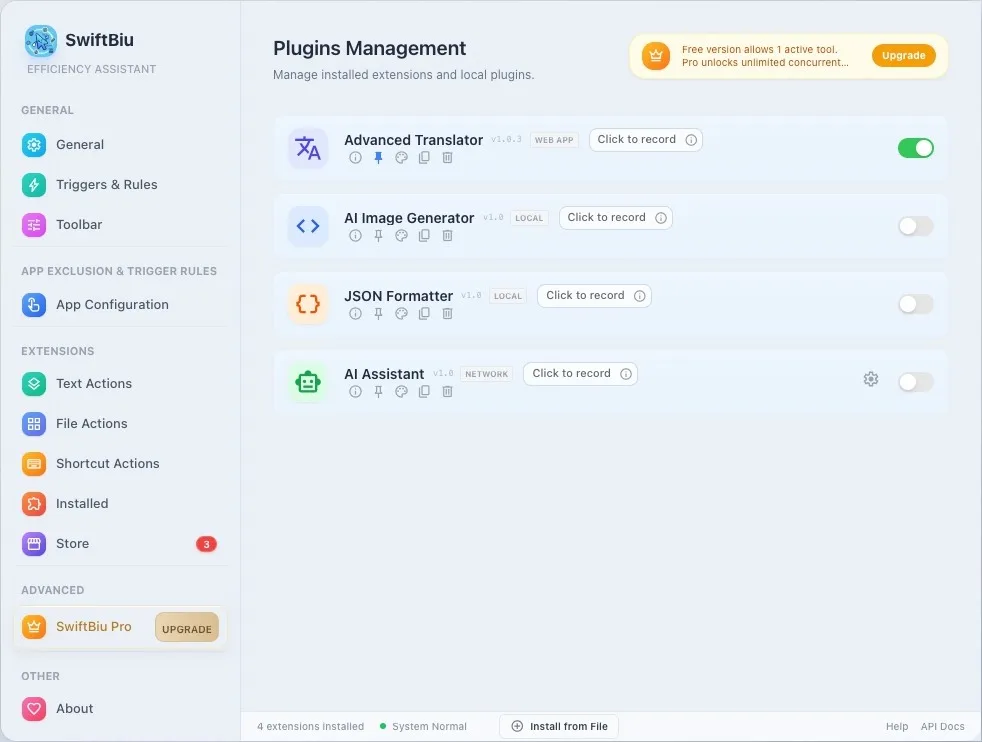
Generate a first installable plugin from a concrete workflow idea.
Explore text, file, API, AI, and Web UI ideas.
Browse the extensions and plugin entry points available on the website.
See how selection-adjacent AI and plugins share the same text action layer.
See the selected-text context where textAction plugins can extend the action layer.
Start with a focused textAction or fileAction, request only the permissions you need, and add a Web UI only when the workflow genuinely needs interaction.