
Active trigger areas
Choose where SwiftBiu is allowed to respond inside an app so sidebars, canvas edges, games, or other sensitive areas can stay quiet.
Per-app context rules
Global shortcuts are useful until every app needs the same behavior. SwiftBiu app configurations can inherit the global defaults or override toolbar actions, triggers, drag routes, and active trigger areas for Safari, Xcode, Finder, or another app.
Quick answer
SwiftBiu supports per-app configuration on macOS. An app can inherit global behavior, expose its own toolbar actions, override copy or gesture triggers, change file drag routes, or restrict where triggers are active inside that app.
Verified 2026-08-12
Choose where SwiftBiu is allowed to respond inside an app so sidebars, canvas edges, games, or other sensitive areas can stay quiet.
Control whether the toolbar appears, which actions are available, and their order for a specific application.
Override copy triggers, gestures, shortcut combinations, quick triggers, and file drag directions per app.
Use an app rule to prioritize translation, search, link handling, or another browsing-oriented action set without changing the global configuration.
Give an editor or development app its own selected-text actions or shortcuts while preserving a different workflow in browsers and chat apps.
Configure file drag directions and default file actions specifically for Finder while other apps inherit the global drag behavior.
SwiftBiu Preferences includes app-specific configuration so routing decisions live in a visible rule system instead of hidden one-off automation scripts.
Read the App configurations section in the guide →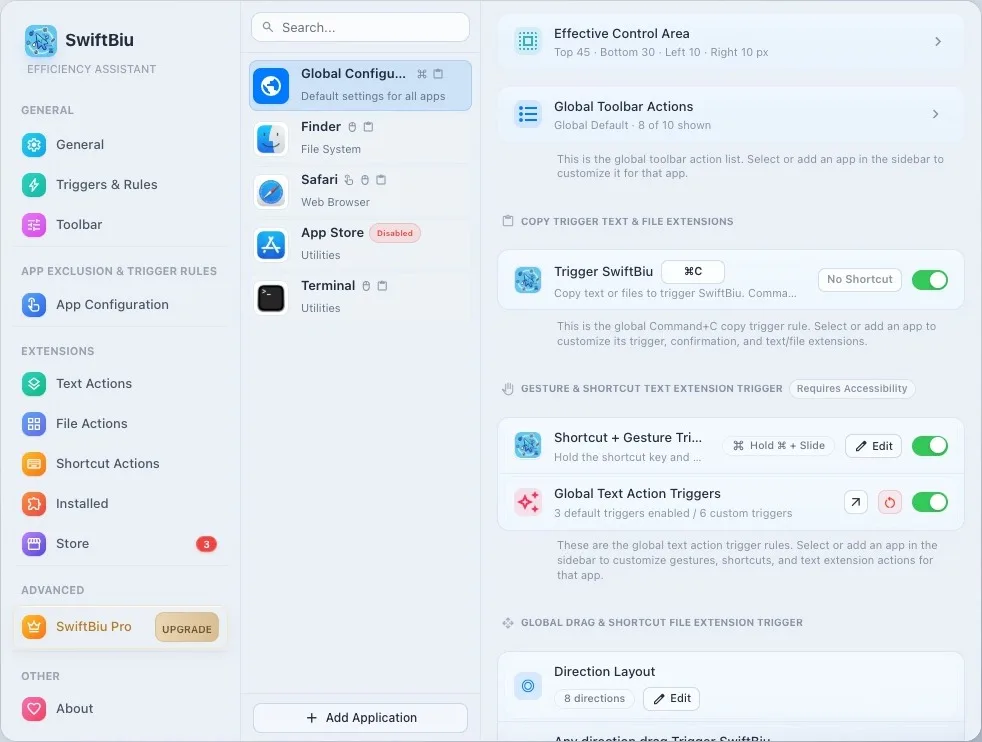
Start with global defaults, then add app-specific rules only where the toolbar, gestures, active areas, or file routes need to behave differently.